Prompt Library & Marketplace
Over 300 ready-made prompt templates for the construction industry — from project schedules to claim notices. Free to use, create your own, share with your team.
What is the Prompt Library?
The Prompt Library is your personal collection of templates. Think of it as a toolbox: instead of writing everything from scratch, you reach for proven templates.
Two areas are available:
| Area | What is it? | Where to find it |
|---|---|---|
| Prompt Library | Your own prompts + prompts from the marketplace | Left menu → "Prompt-Bibliothek" |
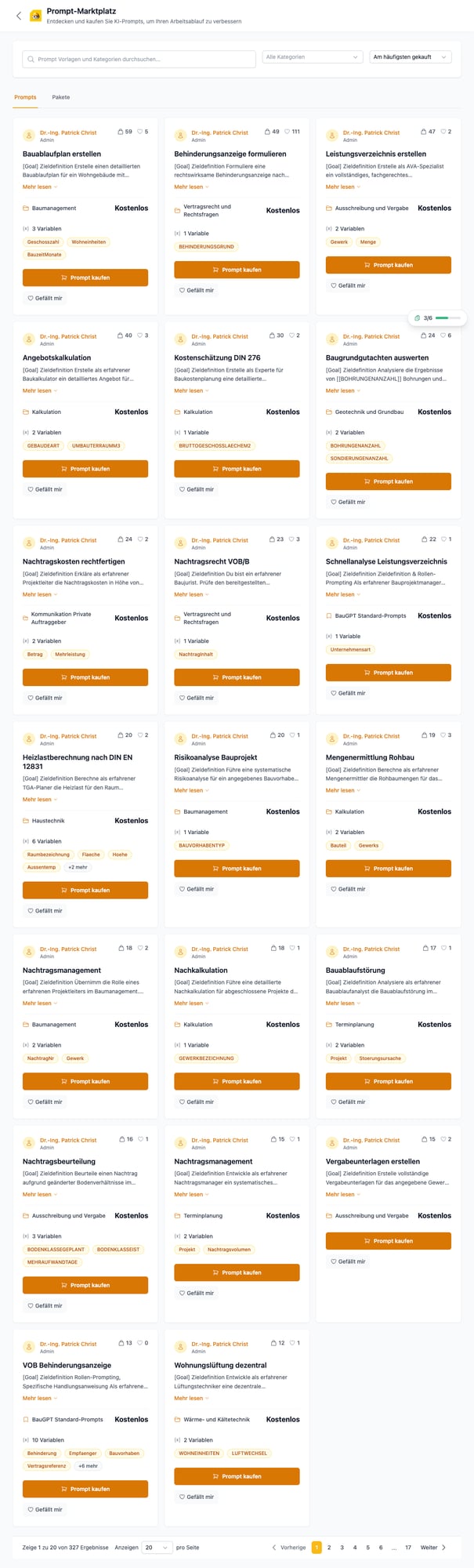
| Prompt Marketplace | 327+ ready-made templates from construction experts | In the library → "Prompt-Marktplatz" button |
The Prompt Marketplace
The marketplace offers over 327 ready-made templates — all free, all created by construction experts. The templates cover practically every area:
Categories
| Category | Example Prompts | Use Case |
|---|---|---|
| Project Management | Construction schedule, risk analysis, claims management | Plan and manage projects |
| Cost Estimation | Bid calculation, cost estimate per DIN 276, post-calculation, quantity survey | Calculate and verify costs |
| Contract Law | Obstruction notice (VOB/B), claims, supplementary justification | Legally sound documents |
| Tendering | Bill of quantities, tender documents, claims assessment | Prepare tenders |
| Geotechnical | Soil investigation analysis | Ground and foundation |
| Building Services | Heating load calculation (DIN EN 12831), decentralized ventilation | MEP planning |
| Scheduling | Construction delay analysis, claims controlling | Manage timelines |
| Communication | Explaining additional costs to private clients | Convince clients |
How to use the Marketplace
Open the Marketplace
Click "Prompt-Bibliothek" in the left menu, then "Prompt-Marktplatz" in the top right corner.
Find a prompt
- Search: Enter a keyword (e.g., "claim", "report", "DIN 276")
- Category: Filter by topic area
- Sort: By popularity, newest, or most purchased
Add to your library
Click "Prompt kaufen" on any prompt (don't worry — all prompts are free). The prompt will appear in your personal library.
Use the prompt
Go back to the library or the chat. In the chat, click the book icon below the text field, select your prompt, and fill in the variables (e.g., number of floors, trade, amount).
Create your own prompts
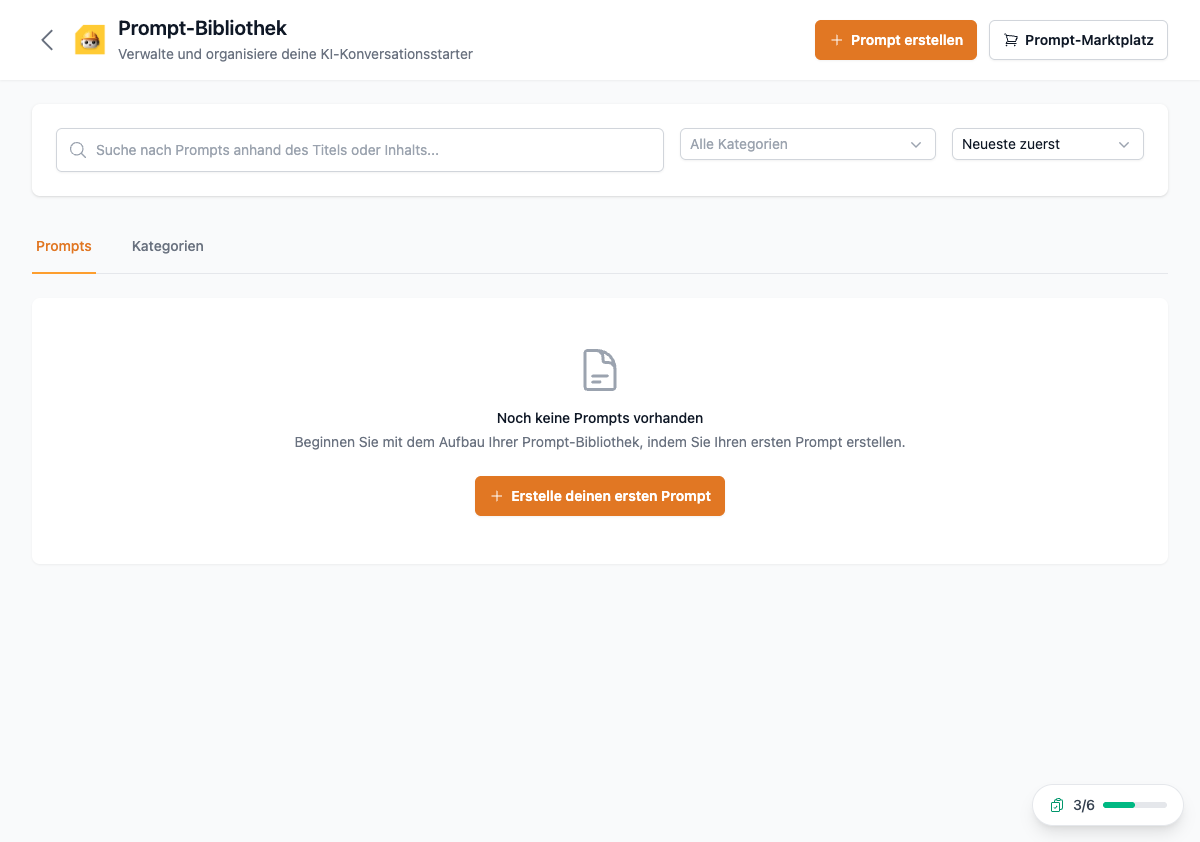
You can also create and save your own prompts:
- Click "+ Prompt erstellen" (orange button, top right)
- Enter a title and description
- Write the instructions — use variables with
[[VARIABLE_NAME]]as placeholders - Choose a category
- Save — done!
Variables — what makes prompts reusable
Variables are placeholders that you fill in each time you use the prompt. Example:
Create a construction schedule for a building with [[NumberOfFloors]] floors and [[Units]] residential units. Maximum construction time: [[MonthsDuration]] months.
When you use the prompt, BauGPT asks you for the values — you enter "4", "12", and "18" and get a tailored construction schedule.
Prompt Tools — AI improves your questions
Below the chat text field, you'll find the "Prompt tools" button (with a New badge). It lets the AI optimize your question before you send it. The AI:
- Adds missing details
- Structures the question better
- Adds relevant context
Helpful when you're not sure how to phrase something.
Foreman Stefan needs a daily report every week.
Instead of typing the same text every time, he created a prompt:
"Create a daily construction report for site [[Project]]. Date: [[Date]]. Weather: [[Weather]]. Workers on site: [[Count]]. Work performed: [[Tasks]]. Notes: [[Notes]]."
Every evening he fills in the 6 fields — the report is done in 2 minutes.
The Prompt Library is a Pro feature. With a free account, you don't have access to the marketplace and can't create your own prompts.
You don't have to start from zero. Check out the 327+ ready-made templates — there's already a prompt for most tasks. You can also use them as a starting point for your own versions.